Thursday, January 05, 2012

Apps for Sensors - List It


Sensors need more structure to keep them on task and avoid distractions.  Wouldn't it be nice to have something handy on your iDevice to quickly set this up?  You are in luck.  QuickTodo lite is one of many apps that do just this.  For Sensors, I like the simple and clean design of this free app...no fancy bells and whistles to take your mind off the task at hand.  QuickTodo lite is a list maker that provides you with boxes to check offwhen you complete a task or step.


You can use it for homework:


You can use it to break a overwhelming task into manageable steps:


Definitely keep this "in hand" for instant structure!

Wednesday, January 04, 2012

Apps for Sensors - Visual Background

Gaze HD - lite provides nine video scenes to "gaze" upon.  Think of these as ways to block out other visual distractions.  You can set it to shuffle through the scenes, but keep it on one preferred scene for the Sensor.  Remember, they don't need random stimulation.  There is an option to play natural sounds that make the view more realistic.   In addition, there is a sleep mode that allows you to set a time before it fades to black.  This would be a great help for those who detect everything to fall asleep, don't you think?


Encourage Sensors to chose a visual background that is most suitable to their needs.  They can sit in front a cozy fire, a waterfall, a snowy day or other restful scenes.  This might just be enough to help structure the setting and limit the variety of visual stimuli coming into view.  It's free, so give it a go.  A paid version with more scenes can be purchased here.


Tuesday, January 03, 2012

Apps for Sensors - Structured Noise

The ticking of a clock is quickly pushed into the background for most people, but this sound is enough to distract Sensors from what they are doing.  Help them to choose a background sound that is predictable, while blocking out other random sounds around them.  Here are a few apps that you can try:


White Noise lite provides ambient noise to block out other distractions.  The free version 10 sounds including rain, crickets, chimes, a fan, waves and a train ride.  You can mix the sounds, but stick to one sound with Sensors.

You can purchase the sister app called White Noise Recorder.  This allows you to record you preferred sounds (a fan you are used to for example).  You take 10 - 30 seconds of the sound and it loops it for continuous play.


Piano Classics is a simple piano music box that plays 15 classical music songs including Chopin, Mozart, Beethoven, Schubert and Wagner to name a few.  Experiment with which song is the "just right" one.

There are many apps out there that fit the bill for calming, ambient background noise...what have you found as a favorite?


Monday, January 02, 2012

Wait! Apps for Sensors

Sensors are those who detect everything.  Nothing gets by them.
This makes them well suited for jobs that require noticing all the details (think airport security).  In some environments, this pattern would make it difficult to focus on important stimuli because they would be attending to even the slightest sounds, sights, taste, smells or touch.  They are distracted or bothered by things others do not even notice.  We have a clock in our conference room at school that separates the Sensors from the Bystanders.  The slight ticking sound is sure to to generate at least one comment while others are oblivious to it!

According to Winnie Dunn's classification of sensory patterns, Sensors direct their attention to the latest stimulus, drawing them away from what they were doing.  When sensitivity interferes with participation, input should still be provided but in a more structured manner.  They still need sensory input, but not random input.  They operate best in a controlled setting. 

Here are ways to structure sensory experiences for Sensors in school:
  • establish routines
  • provide feedback when drifting off
  • reduce visual distractions
  • create predictable patterns of sensory experiences
  • limit amount of information or steps provided to child at one time
  • encourage an even tempo during work time
  • select an even background noise to block out auditory distractions
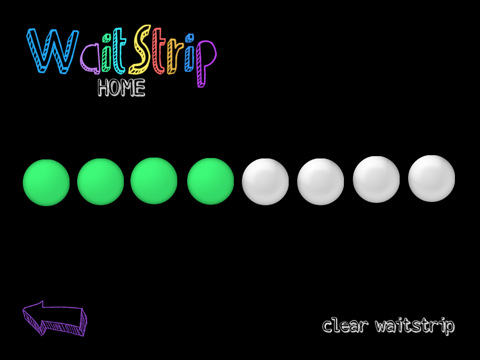
Is there an app for that?  Indeed there is...many in fact.  My favorite is a simple WaitStrip, described this way:
"The WaitStrip provides a concrete visual representation of increments of time, amount of steps to be completed, number of minutes to work, number of math problems to be completed etc. It is a visual guide that allows an individual to remain on task or focused for a duration of time."


You can determine the number of circles (5, 8, 10) to coincide with the number of items or steps to complete.  When one thing is completed, touch a circle and it changes color.  It has a satisfying click sound, but you Sensor may want the sound turned off.  This is just the predictability and structure sensors need...and it is all at your fingertips!


Sunday, January 01, 2012

Plunge into the New Year


Granted, it was sunny and 45 degrees, but walking barefoot with winter coats on after taking a plunge into the North Atlantic is a bit out of the ordinary.  You might even call it "out of the box."

If you were on Easton's Beach on New Year's Day, you would think it was more of the norm, however.  You would have been one of thousands plunging into the chilly water to greet the new year head on. 

How can we jump out of our boxes in school?  What "out of the ordinary" thing will you do?  Bring a crowd with you...it will seem more like the norm.  Guaranteed it will be refreshing!

Saturday, December 31, 2011

Apps for Bystanders - Worksheets A Glow

Most Bystanders look at a worksheet and see "Blah blah blah." Nothing jumps out at them.  How do you add the pizazz that will make them notice?  Glow Coloring is a drawing app that uses brightly colored paints.  I have this app but didn't realized the MacGyver possibilities until I read The Speech Guy's post on Spice up those boring worksheets with your iPad!!  Go there now to see how he uses this in therapy sessions.

There are many apps that offer neon colors, but the game changer is being able to import a photo as a background.  Once you save an online worksheet as an image (pressing the power button and home button simultaneously), you can add it as a background right within the app.  Now draw, trace and circle your choices with glowing colors.  Here are some I have dabbled with:

Therapy Fun Zone's pencil path is a free sample, part of Pencil Adventures you can purchase.


Your Therapy Source offers packets of activities covering a variety of themes that are reasonably priced.  There's usually a sample to try for free.


In addition to suiting the Bystanders in your group, this saves paper - a win win situation!

Friday, December 30, 2011

Apps for Bystanders - Intensify Spelling


Need a way to jazz up your spelling practice?  Try Magnetic Board lite.  It is a simple app that allows you to drag brightly colored magnetic letters onto a dark background, adding touch, sight and sound to your drills.

You can save pictures of the words to your camera roll with a click of a button.  Simply make a new album in your photo app and call it "spelling words."  Now you can create a slide show of the week's list of spelling words for a quick review.  Don't forget to add music to your slide show if this would intensify the experience for your Bystander!


Thursday, December 29, 2011

Apps for Bystanders - Dazzle Your Writing and Drawing


Doodle Buddy is one of my most used apps for drawing and writing.  Kids like to choose their writing tool color but typically they use a white background.  How can we adapt this for Bystanders?  First, use a black background and a neon type color (yellow, orange, pink) to provide a good contrast.  Then, make your pen size thicker.  You would be surprised what a difference this makes.


VS  

You can choose from the list of stickers to draw or write.  Most come with a sound.  Why not use the fire sticker to write a letter F?   Can't you just hear the crackle?  No, really you can.  Giggle along with the smiley face sticker to make an S.  Hear the ball bouncing as you execute a B.


Here are a few more thoughts on intensifying sensory input:
  • Use two fingers to draw to increase the touch feedback.
  • Choose the glitter tool to write...visually engaging, but no mess!

  • Pick an interesting background as your "paper".

Wednesday, December 28, 2011

Apps for Bystanders - Animate Your Drawings


Kidoodle: Pirate is a digital coloring book that tells a story with a twist.  You personalize the pages of this fun pirate tale by adding your own illustrations.  When you are finished, your drawing comes alive!  Objects move, pirates dance, fish swim by, foods disappear and flags get blown way with a canon.  This is sure to catch the eye of even the strongest Bystander!  I have found this app to engage even the most reluctant artist.  Your art is taken to new heights through the animations. 

Watch this video to get a better sense:

Tuesday, December 27, 2011

Apps for Bystanders - Taking Notice of Books!

iBooks is the free app for downloading books to read on your ipad, iphone or ipod touch.  There are so many ways to customize the text, making it ideal for Bystanders.  The text can be made larger.  You can choose the font just right for you.  If you need to keep track of characters in a story,  highlight them by tapping on the word.  An annotation palette pops up, making it easy to choose a color for your highlighted text.  If you are studying adjectives, these can be tapped and highlighted with a different color.  Easily adjust your screen brightness to find the perfect lighting for any environment.  Find a word, character, or phrase anywhere in your book with the built-in search feature.

Enhanced books are well suited for Bystanders.  The latest iBooks version  can now automatically play audio or video included with these enhanced books.  Certain children's books from the iBookstore have the read-aloud feature.  This feature uses a real narrator to read the book to you and in some books will even highlight the words as you read along. 

You can search for "enhanced books" in the itunes store.  Try out Box Head Man to see an example of one.  It is 99 cents, but you can sample the book for free (just make sure you have automatic downloads enabled for ibooks under the app store settings).   I think any bystander would sit up and take notice.

Monday, December 26, 2011

Apps for Bystanders

Bystanders seem to let the world pass by.  They miss much that is going on around them.  This sensory pattern is not necessarily dysfunctional as long as life choices are made with it in mind.  Being a bystander can be a strength in certain contexts.  Imagine a chaotic environment.   You would want someone who could "keep calm and carry on."

Bystanders need sensations intensified so that they notice the important stuff.  Their thresholds are high like seekers...they just never meet them on their own volition.  In order for salient information to be noticed,  it needs to be made bigger, brighter or animated.  In school, accommodations include brightly colored paper under worksheets to bring a student's attention to his/her desk.  Directions or important information are highlighted to separate them from the background.  Are you thinking what I am thinking?  Yes, there's an app for that!

This series of blog posts will look at apps with the Bystander in mind.

Sunday, December 25, 2011

PEACE

PEACE  


 Create your own message with these designer letters, thanks to The Daily Drop Cap

Saturday, December 24, 2011

Fun in the Classroom


I spent time this past Thursday working in a first grade class as the students built gingerbread houses.  Fifth grade students were on hand to give assistance to the younger kids.  This was a great time for me to have my students work on "delicate" touch as they carefully placed the graham crackers together and decorated the sides with candy without them caving in.  There were some mishaps, so frustration tolerance was needed.  They practiced cutting licorice with a plastic knife.  Their inclination was to grasp it like a hammer, but I showed them how to place their index fingers on the top of the knife to exert downward force.  Presto...success.

Photos were shared using Smilebox, a free tool for creating slide shows, invitations or greetings.  Parents got a peek at this fun activity after they were emailed a link.  Sharing school experiences with families is so much easier with technology now.  What is your favorite tool for sharing?

Friday, December 23, 2011

Today's Message


(You know what this means if you work in the schools today.)
To generate your own message, go to Keep Calm-o-matic and create a personalized poster.

Thursday, December 22, 2011

Habits - Still Swimming and Blogging!

Swimming in Walden on the shortest day of the year

Here it is 18 days into my challenge of daily blogging for a month.  Hard? Yes, but worthwhile.  I am back to sharing and in turn, exploring and discovering as well.  After the 30 days, I hope blogging takes a presence in my life just as swimming did (not daily, but as a regular rhythm).  Now to take a deep breath and dive in again!

Wednesday, December 21, 2011

Finishing Thoughts on Seekers

I can't leave this conversation about apps for sensory seekers without mentioning Toca Boca apps.  They add a great combination of quality visuals with sound and touch capabilities.  You end up with an experience full of sensations and delight.


Try the free Toca Hair Salon - Christmas Gift to get a feel for them.   In this app, you can cut, color and put product in Santa's hair.  He may need a beard trim as well.  To top it off, you can us the blow dryer for a surprising effect. 


   What fun!


Now take a look at all the other apps they have created.

Tuesday, December 20, 2011

Seeking Touch


Are you seeking more touch in your life? Try a little game of Fruit Ninja to get your fingers swiping and tapping fruit pieces.  The Lite version is a good start and it is free.  You get a sneak peek at Zen Mode, Game Center Multiplayer and an Arcade Mode.  In Zen mode, you relax and slice.  The arcade mode is played at a more frenzied pace.  You can just taste the fruit as you slice it!  I soon realized I had to upgrade to the full version because we were playing it so much.


Another "touchy" app is Rockmate.  It includes a variety of instruments.  Up to four players can jam on one ipad.  I just showed it to my son (can you tell he is home from college and is my best guinea pig?) and he exclaimed, "Now, this is cool."  He had years of piano but I am hopelessly unmusical.  We still got a beat going.  Put a little rhythm in your life!


Monday, December 19, 2011

Seeking Movement


iMuseCubes is an app that encourages movement...short bits of movement whenever you need it.  For those who have high thresholds and seek movement to meet those thresholds, this little app is ideal.  
They describe it on itunes this way...

"Directions:
Step 1: Notice you're feeling stuck
Step 2: Shake your iMuseCubes
Step 3: You'll see two verbs. Do both at the same time!
Step 4: Repeat at least 3 times for best results
Research shows:
- Our brains evolved at a time when humans walked 12 miles a day.
- The way we move our bodies has a direct effect on the way we solve problems.
- Inspired thinking occurs during the moments of relaxation after focusing hard
- Playfulness increases efficiency, productivity, and overall health. Plus, it's fun!

iMuseCubes was designed with this research in mind. It shakes you out of your regular thinking grooves, giving you access to the brains in your whole body. With iMuseCubes you get to howl, wiggle and whoop your way to new perspectives and greater productivity."


My son and I tried them last night.  I never like shaking my ipad, so luckily they had a shake button.  The sound affects had us both chuckling.  The "laugh" cube was the most contagious but the "howl" cube got us giggling too.  Check out the MuseCubes blog here.  Besides the app, you can buy the actual cubes or make your own!